How to measure a TV
How to measure a TV: screen size is the diagonal of the visible screen, corner to corner, without the bezel. Width and height chart for 32 to 85 inch TVs.
October 9, 2026
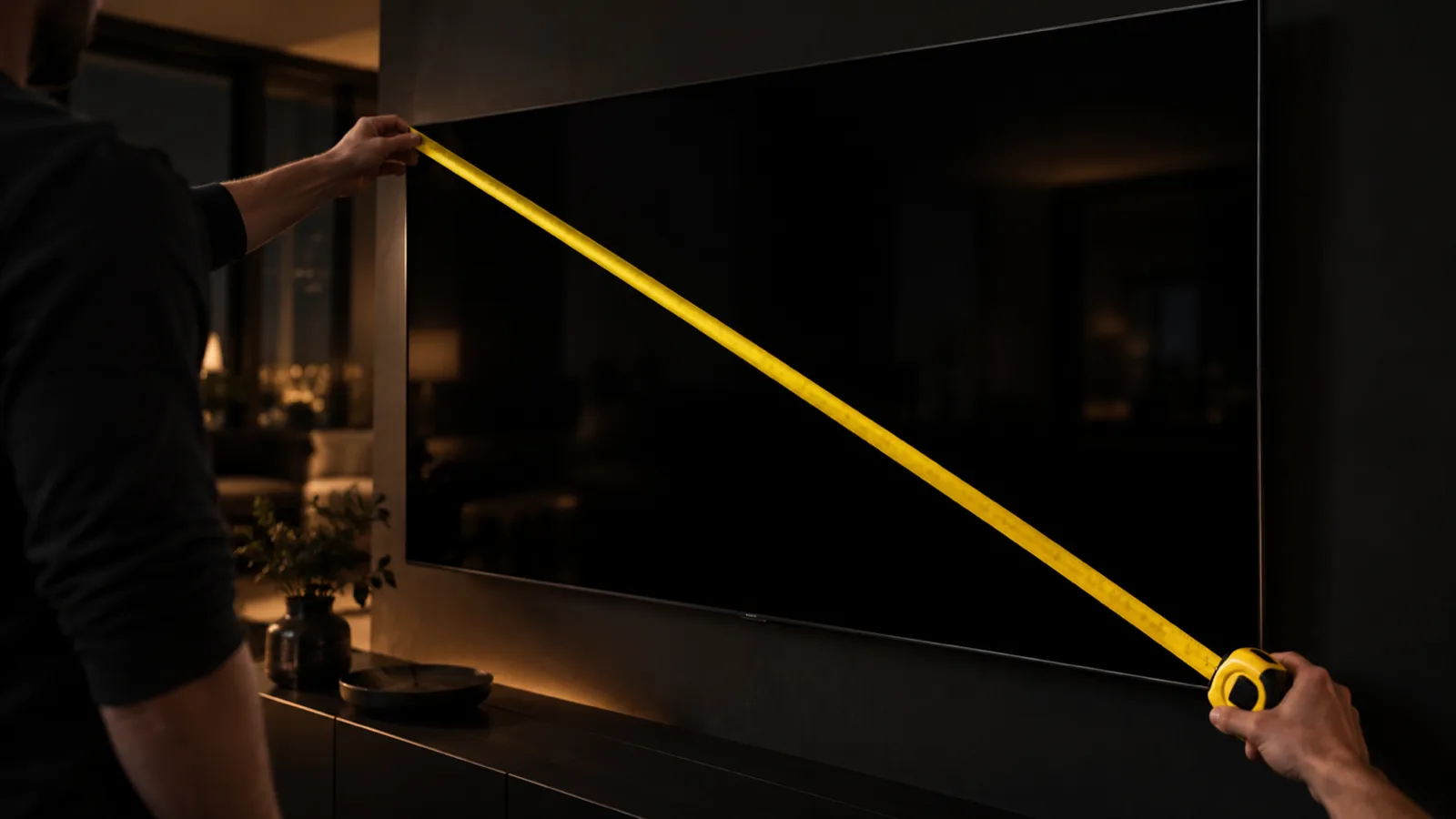
TV size is the diagonal of the visible screen, measured from one corner to the opposite corner. The frame around the screen (the bezel) is not included. To measure a TV, run a tape from the top left corner of the picture area to the bottom right corner and read the number in inches. That figure is the size the TV is sold under.
How to measure TV screen size
- Turn the TV off so the edges of the picture area are easy to see. On most modern sets the black glass extends past the picture, so it helps to turn it on to a bright image and note where the picture stops, then turn it off.
- Hook or hold the end of the tape at the top left corner of the visible screen.
- Stretch the tape diagonally to the bottom right corner. Keep it flat against the screen without pressing on the panel.
- Read the measurement in inches. If you need help with the fractions, see how to read a tape measure.
Use a soft cloth tape or keep a steel tape’s hook off the glass. A metal hook can scratch the screen.
When the diagonal is hard to reach
On a wall-mounted or large TV, it is often easier to measure the screen width and height and calculate the diagonal with the Pythagorean theorem:
Diagonal = √(width² + height²)
If the visible screen is 47.9 in wide and 27.0 in high, the diagonal is √(47.9² + 27.0²) = √(2,294 + 729) = √3,023 ≈ 55 in. That is a 55-inch TV.
Why your measurement can be a little short
Many TVs are sold as a 65-inch class or 75-inch class set. The actual viewable diagonal on the spec sheet can be a fraction of an inch smaller than the class number. If you measure 64.5 in on a 65-inch class TV, your tape is probably right.
TV screen width and height chart
Almost every TV sold today has a 16:9 screen. For that shape, the width is about 0.8716 times the diagonal and the height is about 0.4903 times the diagonal. The table below uses those exact ratios and covers the visible screen only.
| Screen size | Screen width | Screen height | Width (cm) | Height (cm) |
|---|---|---|---|---|
| 32 in | 27.9 in | 15.7 in | 70.8 | 39.8 |
| 40 in | 34.9 in | 19.6 in | 88.6 | 49.8 |
| 43 in | 37.5 in | 21.1 in | 95.2 | 53.5 |
| 50 in | 43.6 in | 24.5 in | 110.7 | 62.3 |
| 55 in | 47.9 in | 27.0 in | 121.8 | 68.5 |
| 65 in | 56.7 in | 31.9 in | 143.9 | 80.9 |
| 75 in | 65.4 in | 36.8 in | 166.0 | 93.4 |
| 77 in | 67.1 in | 37.8 in | 170.5 | 95.9 |
| 85 in | 74.1 in | 41.7 in | 188.2 | 105.8 |
The whole TV is larger than these figures. The bezel adds a little on every side, and the stand adds height and sets the footprint on the furniture. Bezel width differs between models, so for fitting a TV into a cabinet or alcove, use the overall dimensions on the manufacturer’s spec sheet. Most list the size with and without the stand, plus the depth.
Measuring the space for a new TV
Measure the space before you choose a size. Write down width, height and depth.
On a stand or cabinet
- Width: measure the top of the stand from end to end. Compare it to the TV’s overall width, or to the distance between its feet if the feet sit near the edges. Some TVs have feet at the far ends and need a stand nearly as wide as the screen.
- Depth: measure from front to back of the top surface. Check this against the depth of the stand on the spec sheet.
- Height: if the TV sits in a cabinet opening or under a shelf, measure the clear height and compare it to the height with stand. Leave a little room for ventilation and for reaching the cables.
Inside an alcove or entertainment center
Measure the opening width at the top, middle and bottom, and use the smallest number. Do the same for the height on the left, center and right. Old cabinets were often built for deep CRT sets, so depth is rarely the problem, but the width usually is.
On the wall
- Measure the open wall width and make sure there is clear space beyond the TV’s overall width.
- Find the studs or check what the mount needs for your wall type.
- Check the mount pattern (VESA) on the TV’s spec sheet against the mount you plan to buy.
Mounting height is a matter of comfort. A common guideline is to put the center of the screen near eye level from your main seat. Seated eye height for many people on a typical sofa is often quoted at around 42 in from the floor, but sofas and people vary, so sit down and have someone measure to your eye line. Mounting high above a fireplace pushes the screen well above that line.
To get the wall level, put your phone on the top edge of the mount and use a bubble level. The free level app works for this.
How far to sit from the TV
There is no single correct distance. Two widely cited guidelines describe how much of your horizontal field of view the screen should fill:
- SMPTE: about 30 degrees, often treated as a minimum for TV and movie watching. For a 16:9 screen, this works out to about 1.6 × the diagonal.
- THX: about 40 degrees for a more immersive, cinema-like view. That is about 1.2 × the diagonal.
Closer means a bigger-looking picture. Farther is more relaxed for news and everyday viewing.
| TV size | THX ~40° | SMPTE ~30° |
|---|---|---|
| 43 in | 4.3 ft (1.3 m) | 5.8 ft (1.8 m) |
| 50 in | 5.0 ft (1.5 m) | 6.8 ft (2.1 m) |
| 55 in | 5.5 ft (1.7 m) | 7.5 ft (2.3 m) |
| 65 in | 6.5 ft (2.0 m) | 8.8 ft (2.7 m) |
| 75 in | 7.5 ft (2.3 m) | 10.2 ft (3.1 m) |
| 77 in | 7.7 ft (2.3 m) | 10.4 ft (3.2 m) |
| 85 in | 8.5 ft (2.6 m) | 11.5 ft (3.5 m) |
Distances are from your eyes to the screen. Measure from the wall or stand position to where your head rests on the sofa, then pick the size range that fits. Picture resolution and personal preference both matter, so treat the table as a starting range.
You can turn it around too. Divide your seating distance in inches by 1.6 for the SMPTE size, or by 1.2 for the THX size. At 9 ft (108 in) that gives roughly a 68-inch to 90-inch screen.
Quick checks with your phone
If you are standing in a store or a room without a tape, the Width tool in Measuring Tape & AR Ruler App can give you a quick reading of a wall or stand with your iPhone camera. See the ruler app page for details. AR measurements are close but not exact, so confirm with a tape before you buy a mount or a cabinet. For more ways to estimate size, see how to measure without a tape measure.